Unity and Audio
Today, I uploaded my final submission for the audio module at university.
While I’m very pleased at how it ended up, it had a rough start.
Basically, I didn’t read the assessment brief, and tried to recreate Abe’s Oddysee, assets and all!
Because of this, I had to start over in the middle of the project.
In the end, I created a similar project with free-to-use assets.
The project contains spatial localisation, attenuation, reverb and many other interesting audio buzzwords.
The core design principle for the game was “simplicity”. Basically, I wanted to see how effective Unity’s built-in audio handler was at processing audio for a simple project.
While this meshed well with the scope of this project, if it were to be any bigger, I would have implemented third-party audio software, like Wwise or Fmod.
A brief overview of the project
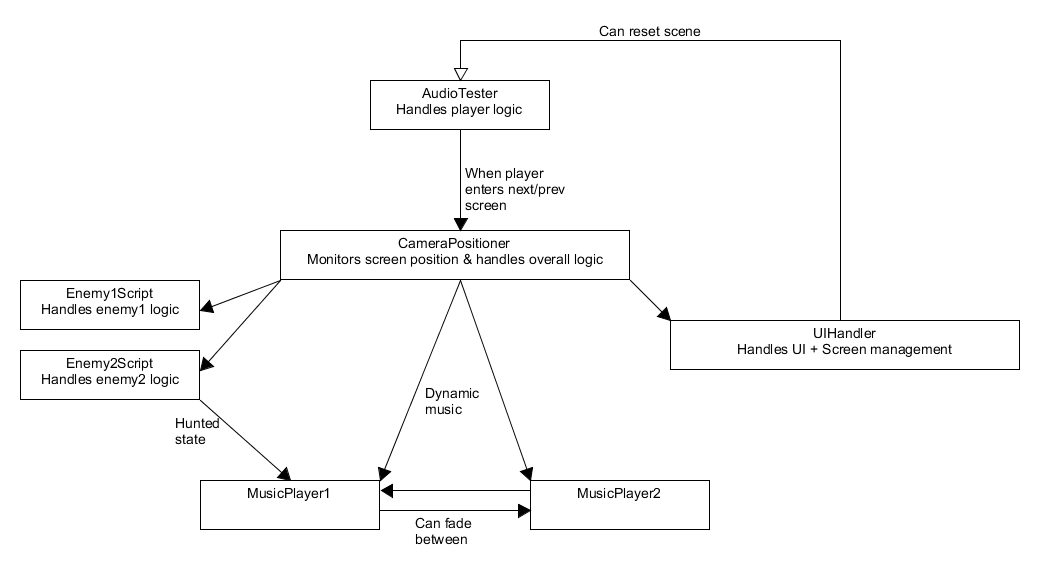
The core of the project is a dynamic music system, which plays music based on the player’s position relative to the enemy.
It’s based on a state-machine, and looks like this:
Calm
There are no enemies near the player. The music player will play short pieces of music every 10-15 seconds.
Danger
There is an enemy one screen away. The music fades to a very ominous track, and footsteps can be heard from the next screen over.
Imminent danger
There is an enemy on screen. The music fades to an oppressive track, which will loop as long as the player remains. In the background, a timer is started - more on that later.
Hunted!
An enemy has seen the player, and is actively hunting the player. The music switches to a frantic track which will override any other state, until either the enemy or player is dead.
Dead
The player has died. A short, disappointing track plays.
A word on music transition
The singular most challenging part of this project was to seamlessly transition between the “imminent danger” and “hunted” tracks.
While you can ask Unity to wait until an audio piece has ended to play another, it’s a bit more difficult to get it to play an audio track exactly at a specific time.
For this project, I wanted the music to be played at the end of the current bar* of music.
In order to calculate the length of a bar, I had to do a few rudimentary calculations.
First, I calculated the tempo of the track via Garage Band on my iPhone, which turned out to be 110 BPM.
Then, I divided this number by 60, in order to get the beats per second.
With the beats per second calculated, I simply had to multiply by 4, in order to get the duration of a bar.
I then started a timer when the player enters the “danger” state, and when this timer reaches the calculated duration, it can change to the “hunted” track.
* A bar of music is the amount of beats indicated by a time signature. For 4/4 time signature, this is 4 beats, while for 3/4, it would be 3 beats.
And that concludes my project!
Thanks for reading.